



TL;DR
- Check ID Free Fire involves multiple tasks like finding your UID, running official ban checks, confirming nicknames for top-ups, and more.
- Your UID is public information and can be shared safely, but be wary of sites requesting personal account details like passwords.
- Garena's official account checker can verify if an account has been flagged for hacking but does not provide comprehensive profile information.
Disclaimer: This summary was created using Artificial Intelligence (AI)
Check ID FF is one of those searches that sounds simple until you actually try it, because half the internet is selling you a tool Garena never built. Your Free Fire ID never changes. Your nickname does. Your avatar does.
That one number is what top-up shops, tournament organizers, and the guy you just got wiped by all rely on, and it’s why “check ID Free Fire” turns into five different requests wearing the same three words.
We split the real methods from the noise: how to pull your own UID, what Garena’s official checker actually tells you, which third-party checks are worth trusting, and which ones are built to steal your account.
What Is Check ID Free Fire?
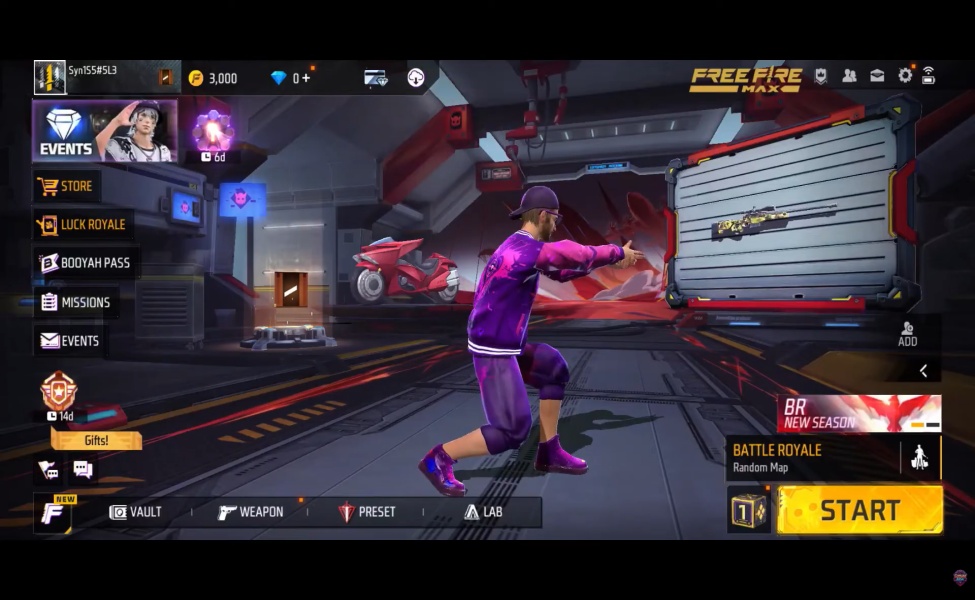
Nobody has released a single app called “Check ID Free Fire.” The phrase covers five separate jobs that players lump together:
- Finding your own UID inside the game
- Running an official ban or hack-status check through Garena’s support page
- Confirming a nickname and region before a diamond top-up
- Looking up a public profile: stats, guild, age of account, verified badge
- Wading through “verify ID,” “FF Kipas,” and “unlock all” pages that have nothing to do with Garena
Remember one thing before anything else: your UID is public. Treat it like a mailbox number, not a key. Sharing it does not let anyone into your account.
If a site asks for your password, your OTP, your recovery email, or a login “just to check the ID,” it isn’t checking anything. It’s trying to take your account.

How to Find Your UID in Free Fire (Official Way)
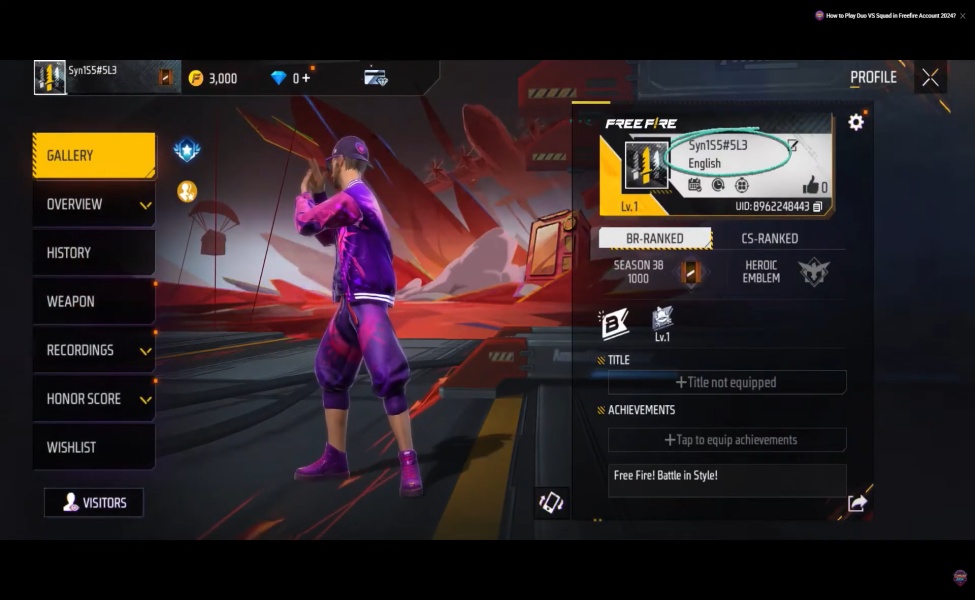
This part is deliberately boring, and that’s exactly why it works every time.
- Open Free Fire or Free Fire MAX.
- Tap your avatar in the top-left corner of the lobby.
- Look directly under your nickname and like count. That string of numbers is your UID.
- Tap the copy icon instead of typing it from memory.
Garena’s own support pages describe the exact same steps: tap your name on the main screen and the ID sits right underneath.
Once you have it, use that number for adding friends through Friends → Add, filing official support tickets, diamond top-ups that only ask for a Player ID, redeem pages after logging in with Google, Facebook, VK, or Apple, and tournament sign-up forms that pair ID with nickname.
See Also: Free Fire Scarlett Moon: Dates, Free Bundle & MAG-7 Skin
The Official “Check Account” FF Tool
The one legitimate checker lives on Garena’s own support site at ff.garena.com/en/support (regional versions exist too).
Look for a box labeled Account Check, paste in a UID, and it tells you if that ID has been flagged for hacking.
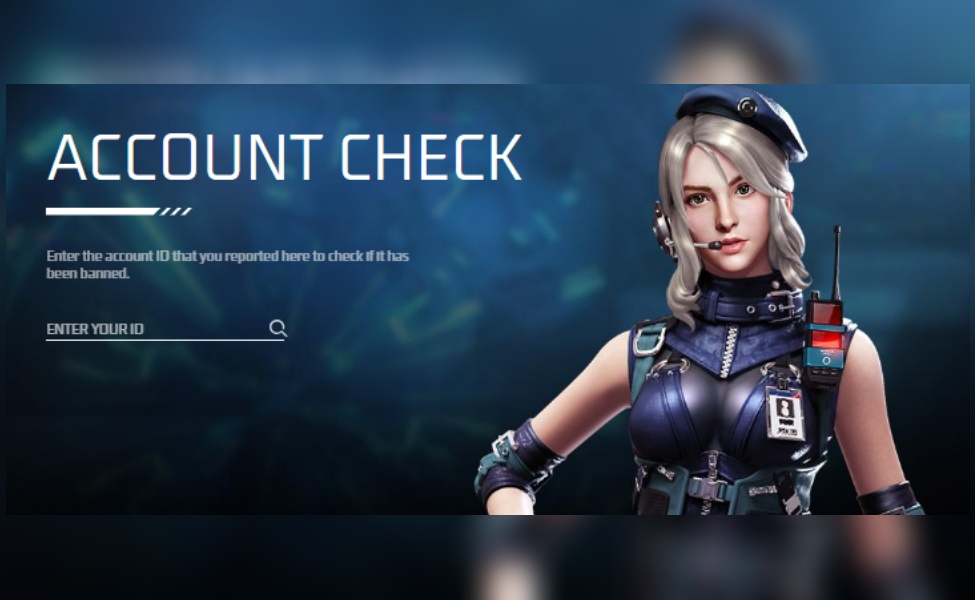
A clean account typically returns a message along the lines of “there is currently not enough evidence to prove that this account is using hacks.”
A banned ID comes back confirming the account used hacks and was punished around a specific month and year, which is the exact line creators quote when they call out a suspected cheater on stream.
What this tool does not do matters just as much:
- It’s not a full profile viewer
- It’s not an unban button
- It doesn’t guarantee your account is safe forever
- It won’t show skins, last login time, or anything resembling a credit score
If your login screen already says the account is suspended, you have your answer. From there, the only real path is appealing through ffsupport.garena.com using the linked Google, Facebook, VK, or Apple account, never a paid “unban by ID” service.
Garena’s own definition of cheating stays blunt: unofficial programs, modified clients, or features that don’t exist in the real game. That’s the standard the checker runs against.
Why UID Digits are a Flex
Community memory on UID length is consistent even though Garena never published an official chart. Accounts from the earliest days of the game, around 2017, tend to carry shorter UIDs, often seven digits.
The 2018 to 2020 wave landed closer to eight or ten digits, and later years pushed ten digits into the standard, with some newer accounts running longer than that.
Indonesian player guides still treat a seven-digit UID as proof an account was born with the game. Brazilian communities go further, treating the earliest IDs as sequential relics starting near 10,000,001.
Take the exact starting number as a rough estimate rather than fact, but the pattern holds: shorter and smaller usually means older.
That’s why “who has the oldest ID” videos still pull views. Creators hunt down low-digit accounts, comments fill with eight-digit flexes, and an old UID gets treated like a Season 1 Battle Pass that never comes back around.
To be clear, the number itself isn’t valuable. It’s a timestamp. What actually makes an old account worth anything is the rare bundles, discontinued Elite Pass cosmetics, and medals that vanished from the shop years ago and sit attached to that ID.
See Also: FF x Naruto Chapter 3: What’s Actually Confirmed
The One Third-Party Check That’s Actually Useful: Top-Up Nickname Lookup
Before buying diamonds outside the in-game shop, most legitimate top-up stores run your Player ID through Garena’s official shop endpoints, the same APIs behind platforms like shop.garena.my.
Enter a valid ID, and the system pings the server to return your exact in-game nickname and region. That verification is the entire point.
Diamonds land instantly on whatever number you type, with zero refunds if you mistype a single digit. A service that pulls your nickname and server before you spend a single cent is doing its job right.
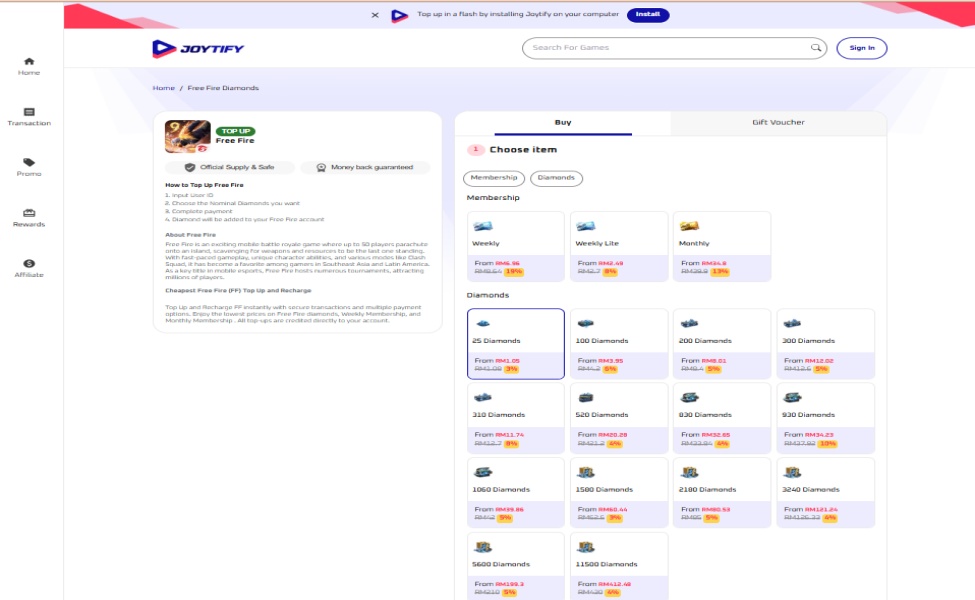
Beyond standard Garena recharge portals, established third-party platforms like Joytify use this exact UID-only validation system to offer lightning-fast, discounted recharges. Because they only need your Player ID, you never risk your account credentials.
The top-up process on Joytify takes four simple steps:
- Input Your User ID: Paste your UID directly into the bar. The system verifies your account handle instantly so you know your diamonds are headed to the right vault.
- Select Your Diamonds or Membership: Pick your bundle, from small top-up top-offs (25 or 100 diamonds) to massive crates (up to 11,500 diamonds). You can also lock in discounted Weekly, Weekly Lite, or Monthly Memberships to maximize your daily diamond claims.
- Complete the Payment: Choose from secure payment channels with competitive regional pricing that regularly beats in-app store rates.
- Instant In-Game Delivery: The diamonds or membership perks credit straight to your account mail within seconds.
Some developers publish unofficial wrappers around shop endpoints to validate an ID before money moves, though those hit captcha walls and never hand out private profile data.
Remember the golden rule of account safety: if a website asks for your Facebook, Google, or VK login to “confirm” a top-up or unlock bonus diamonds, close the tab immediately. UID-only validation is the gold standard. Safe platforms never ask for your password.
Redeem Codes Also “Check” Your ID: The Safe Way
The official redeem portal sits at reward.ff.garena.com, with India running a separate portal in some regions. You never paste a UID into a mystery box here.
Instead, you log in with the same Google, Facebook, VK, Apple, X, or Huawei account bound to your game, the site shows your nickname and region so you can confirm it’s really your account, and then you enter the code.
Rewards usually land in your in-game mail within 24 hours. Guest accounts can’t redeem codes, and most codes are region-locked and one-use only. If a page wants your redeem code and your password on the same screen, it isn’t the real redeem site.
See Also: Booyah Pass Season 44: An Apple a Day, Diamond Economy Breakdown
Community Profile-by-ID Tools
Search “Free Fire ID check” and Brazilian and global fan sites will promise you nickname, level, likes, region, guild, BR or CS rank, equipped skins, account creation date, last login time, and even Garena’s official verified badge, all from a single UID.
Some long-running Brazilian sites do claim to pull live public profile data, including last-login timestamps, and players use them to scout upcoming opponents, check if a seller is lying about account age, or confirm a creator’s verified status.
Other testers are far less convinced. When they entered random, made-up numbers into popular “UID lookup” pages, several still returned a full, polished profile.
Their conclusion: if any random string of digits comes back with detailed stats, you’re looking at placeholder data, not a real Garena pull. The only profile view guaranteed to be accurate is inside the game itself, through Friends → Add → paste UID.
The honest breakdown looks like this: nickname and region from shop-style checks tend to be real, the official support ban check is real, full stats or exact creation dates from random websites should be treated as unverified until you confirm them in-game, and any site claiming it “unlocked your diamonds after you verified your UID” is fake every time.
Daily lookup limits, region dropdowns, and “support our API costs” banners are common across these community tools, and none of them replace the official support page or your in-game friend search.
How Players Actually Use ID Checks in the Wild
Pulled from forums, YouTube comments, and squad chats, the everyday use cases stay fairly consistent.
Someone gets wiped by a player who clearly knows what they’re doing, pastes that UID into the official ban checker, and either finds a clean record confirming a genuinely skilled opponent or a hack flag that explains everything.
Buyers run a shop-style check before sending diamonds, making sure the returned nickname matches before any payment goes through. Friends trade UIDs over WhatsApp or Discord because nicknames collide too often to be useful.
Shoppers eyeing a secondhand account combine community age-estimation tools with an in-game profile check, aware the whole market sits outside Garena’s terms of service.
Fans confirm if a creator actually holds the official verified badge through BR community badge-checkers.
And players who get locked out attach their UID to a support ticket, understanding that the UID is evidence for the case, not the key that gets them back in; the actual login still runs through the linked Google, Facebook, or Apple account.
Account-sale situations follow a familiar and rough pattern too. A seller shows off their inventory on video, the buyer asks to log in and inspect it directly, the account’s security email is still sitting in its 15-day pending window, and the account gets hijacked or force-banned soon after.
Public threads on r/freefire are full of that exact sequence playing out. The lesson holds regardless of who’s asking: never hand over a login to “check” anything.
What Decides If an ID is Worth Something
Garena’s rules say accounts shouldn’t be sold, and the gray market ignores that anyway. When it does happen, buyers price an account against a short checklist: how old the ID is and if it still holds items that never came back, rank history like Heroic or Grandmaster screenshots, Evo guns and collab bundles, discontinued Elite Pass cosmetics, level and likes as a weak supporting signal, and a clean result on the official ban check.
A seven-digit ID from 2017 with an empty inventory is a museum piece, not a jackpot. A newer account stacked with limited collab skins can still command a higher price in gray-market chats than a much older, barer one.
Either way, buying an account is a gamble on both sides: the original owner can reclaim it through the linked social account whenever they want, and Garena can ban both parties involved.
Quick Survival Card
Here’s the short version worth screenshotting. Copy your UID from your in-game profile, run the ban check on ff.garena.com’s support page, redeem codes only on reward.ff.garena.com, top up diamonds using UID and nickname confirmation and never a password, and appeal bans only through ffsupport.garena.com after logging in with your bound account.
On the other side, never trust a page that asks you to “verify your ID to unlock diamonds,” never download a random FF Kipas or beta APK to finish a check, never pay anyone to unban or recover an account “by ID,” never let a buyer or self-described helper log into your account to inspect it, and never trust a stats page that hands back a full profile for numbers you made up on the spot.
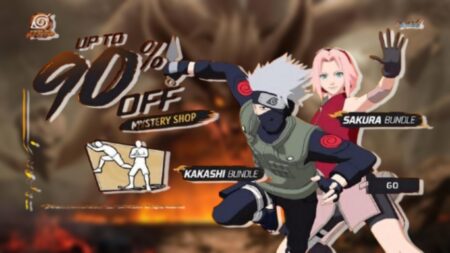
See Also: FF Mystery Shop July 2026: Andra ST Leaks & Up to 90% Off
Check ID FF boils down to one number doing five different jobs, and knowing which job you actually need keeps you out of the scams built around the other four.
Your UID is a public passport stamp: permanent, safe to share, and useful for the official checker, top-up confirmations, and support tickets.
The moment a site starts treating that number like a skeleton key that unlocks accounts, diamonds, or verification, that’s your signal to leave.
Drop your UID in the comments if you’re hunting for a squad, tell us what you’d call a solid K/D ratio this season, and let us know the rarest item currently sitting in your vault.
FAQs
Your Free Fire ID is displayed on your in-game profile page, directly below your nickname. Unlike your username or avatar, this number is permanent and never changes no matter how many times you update your profile.
Yes, by entering a suspicious player's ID into legitimate stat-tracking sites, you can review their historical win rates, headshot percentages, and kill ratios for unusual spikes. Abnormally high stats that appear suddenly are a common indicator of cheating, though they are not definitive proof on their own.
Many sites claiming to offer ID lookup tools are not officially affiliated with Garena and may attempt to steal your account credentials or install malware. You should only use well-known community stat trackers and never enter your account password on any third-party website.
Looking for a place to FF topup that is safe and fast? Joytify is a go-to for gamers in Malaysia with round-the-clock service.
TL;DR
- Check ID Free Fire involves multiple tasks like finding your UID, running official ban checks, confirming nicknames for top-ups, and more.
- Your UID is public information and can be shared safely, but be wary of sites requesting personal account details like passwords.
- Garena's official account checker can verify if an account has been flagged for hacking but does not provide comprehensive profile information.



2 Comments
Pingback: Guide to Earn Money on Chamet: Diamonds to Payouts
Pingback: Sasuke Bundle in FF x Naruto 2026: Release Date, Odds & Costs